How to Use Copart Auction Data in Automotive Products
Copart auction data can power vehicle marketplaces, importer websites, dealer dashboards, VIN research products, salvage-yard tools, auction alerts, pricing analytics and internal automotive data systems.
The useful part is not simply displaying a Copart lot. A production product must decide how auction inventory is searched, how vehicle pages are structured, which fields are cached, how changing auction records are synchronized, how missing data is handled and which actions should trigger a fresh API request.
The Apibara.tech Vehicle Auction Data API provides supported Copart and IAAI records through a structured JSON interface. This guide focuses specifically on how Copart data can be used inside real automotive products.
Developers use Copart auction data to build searchable vehicle inventory, lot detail pages, VIN auction-history features, importer and dealer workflows, auction monitoring, pricing tools and synchronized automotive databases.
Searchable Vehicle Inventory
Build filters, listing cards, galleries, vehicle pages and related-inventory recommendations from structured auction records.
Sourcing and Logistics
Combine auction pricing, condition, title, facility and shipping-related data into vehicle sourcing and landed-cost workflows.
History, Alerts and Analytics
Use current and retained historical auction records for VIN research, monitoring, pricing analysis and internal datasets.
What Copart Auction Data Is Useful in a Product?
A Copart vehicle record can contain different groups of information depending on the lot and auction state. Commonly useful groups include vehicle identity, auction timing, prices, damage and condition, title documents, location, seller information and media.
Production applications should not require every field to exist. VINs can be partial or unavailable, prices can be missing before or after an auction, and the available photos or condition fields can differ between lots.
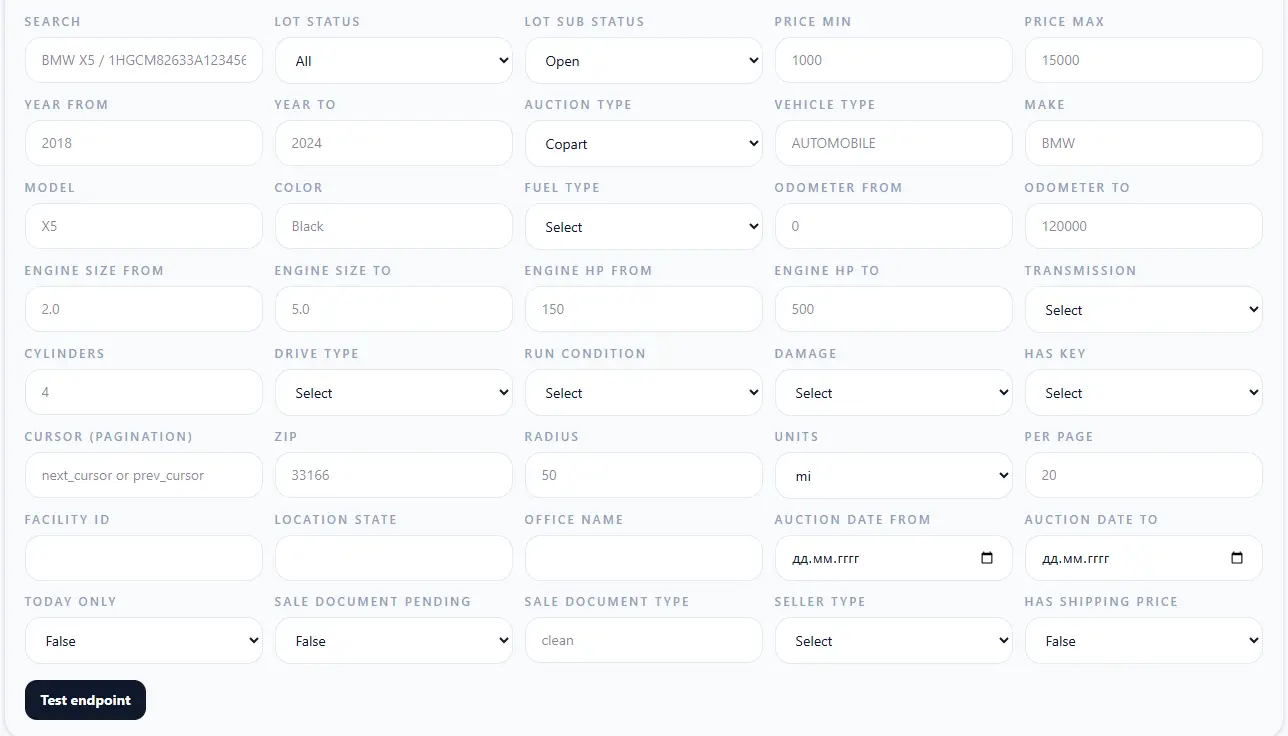
Build a Copart Vehicle Marketplace or Auction Catalog
A marketplace usually starts with a searchable vehicle index rather than individual VIN requests. Users may filter Copart inventory by make, model, year, location, auction status, damage, odometer or title-related fields.
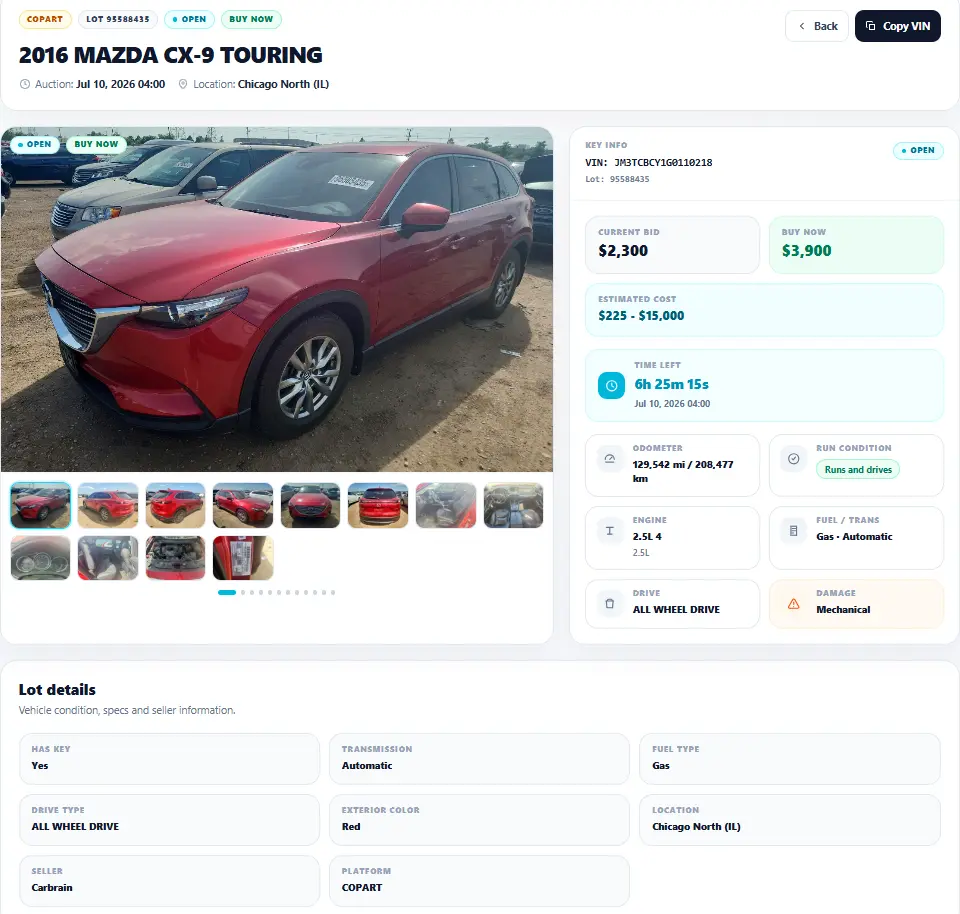
Each vehicle page can then load a detailed record containing the lot number, VIN, vehicle specifications, pricing, auction state, damage, location and available photos. Related-vehicle data can be used to keep users browsing comparable active or upcoming lots.
Detailed implementation: Auction Data API for Automotive Marketplaces.
Use Copart Data in an Auto Import or Export Platform
Importer websites can combine auction records with their own pricing, logistics and customer-service layers. Copart data provides the vehicle side of that workflow; the importer can then add fees, transport, port costs, customs logic and destination-specific calculations.
Search by vehicle, damage, title, facility and auction date.
Combine auction values with transport, port and destination costs.
Display inventory using local currency, language and business rules.
Refresh auction status and selected pricing fields while the lot is active.
Create Dealer, Broker or Buyer Dashboards
A dealer dashboard can organize Copart records around customers rather than around the auction itself. Users may save vehicles, create custom searches, track upcoming auctions and attach lot numbers or VINs to CRM records.
Saved inventory
Store stable identifiers and refresh the current lot information when a user returns.
Customer searches
Persist make, model, year, damage, location or price preferences for each buyer.
Auction calendar
Organize selected lots by sale date and current auction state.
CRM enrichment
Attach auction records and vehicle links to leads, customers or buying opportunities.
Add Copart Auction Records to a VIN History Product
VIN-based products can use retained Copart auction appearances to show how a vehicle was presented at an auction, including available lot information, photos, damage, odometer, pricing and sale dates.
Auction history must be described precisely. It is not the same as a complete ownership, accident, insurance, registration or government-title history, and an empty auction-history response does not prove that a vehicle has never appeared at an auction.
Read the dedicated VIN Auction History API guide for the history-specific workflow.
Show retained earlier auction records when available.
Add available auction imagery to vehicle research.
Compare retained previous sale or auction pricing when available.
Identify multiple retained records associated with the same vehicle.
Find Donor Vehicles for Auto Recycling and Salvage
Recyclers and salvage yards can search auction inventory for potential donor vehicles using make, model, year, location, damage, run condition, title data and available photos.
Auction data can help narrow the candidate list, but it should not be used as proof of mechanical condition, part interchange, repairability or resale profitability.
For a dedicated sourcing workflow, see Vehicle Auction API for Auto Recyclers.
Monitor Copart Lots and Create Auction Alerts
Monitoring systems can periodically refresh selected vehicles and compare the normalized record with the previously stored version. Notifications should be based on fields that matter to the user instead of alerting on every backend refresh.
Alert when a sale date or relevant auction state changes.
Track supported bid or Buy Now changes where available.
Detect newly available condition, title or media fields.
Handle ended, sold, removed, rescheduled or relisted lots.
For refresh behavior and supported live-auction fields, read Real-Time Vehicle Auction Data API.
How to Synchronize Copart Auction Data into Your Application
Large applications should avoid downloading the complete inventory every time a user opens the site. A better architecture separates user-facing API calls from background synchronization.
Retrieve the records needed by the product and store their identifiers locally.
Process records according to their normalized update order instead of repeating a full import.
Insert new vehicles and update existing records using stable internal identifiers.
Refresh active or user-selected lots more frequently than inactive historical records.
updated_at value represents when relevant lot data changed. This makes it suitable for incremental synchronization workflows rather than treating every collection cycle as a new record change.Other Products That Can Use Copart Vehicle Data
Pricing Analytics
Analyze retained prices together with make, model, year, location, damage and other vehicle attributes.
Inventory Intelligence
Measure available inventory by model, age, condition, facility or auction period.
Shipping Calculators
Combine auction location with supported transport and auction-to-port workflows.
WordPress Auction Listings
Display API-backed inventory, search filters, galleries and lot pages on automotive websites.
Internal Data Warehouses
Synchronize selected auction records into internal databases, CRMs, search engines or analytics systems.
AI Automotive Tools
Allow backend AI agents to search documented auction data, compare vehicles or summarize records without exposing the API key.
Map Each Product Feature to the Right API Request
A production application should not load every available endpoint for every page. Use the smallest request that supplies the data required by the current user action.

/vehicles/vehicles/{slugVin}/vehicles/{slugVin}/history/vehicles/{slugVin}/related/vehicles/filters/locations/vehicles/{slugVin}/shipping/shipping/auction-to-portSearch Copart Auction Inventory from a Backend
The main listing endpoint can search supported Copart records using structured filters. The exact filters and response fields should always be taken from the current endpoint documentation or OpenAPI schema.
Store the API key in a backend environment variable or secret manager rather than embedding it in frontend JavaScript.
export APIBARA_API_KEY="YOUR_API_KEY"

curl --request GET \
  --url "https://apibara.tech/api/v1/vehicle-auction/vehicles?platform=copart&make=toyota&model=camry&year_from=2020&year_to=2026&lot_status=All&per_page=12" \
  --header "Accept: application/json" \
--header "X-API-Key: ${APIBARA_API_KEY}"Copart-Only Product or Multi-Auction Product?
A product focused exclusively on Copart can filter the API by platform=copart and keep its product experience Copart-specific.
If the application later needs IAA or IAAI inventory, Apibara.tech provides both supported sources through the same normalized API layer. The underlying source records can still differ, so applications must continue to handle nullable and source-specific values correctly.
For source-specific API details, use the Copart API for Vehicle Auction Data guide rather than this product-workflow article.
How to Start Using Copart Auction Data
Buyer, dealer, importer, recycler, analyst or internal team?
Search, compare, source, monitor, research, analyze or ship?
Separate required application fields from optional auction data.
Use lots with missing VINs, prices, history or media.
Choose which records need background updates and how frequently.
Load details, history and related data only when the user needs them.
Machine-Readable Copart API Resources
Developer tools and AI coding agents should use the OpenAPI schema for exact request parameters and endpoint structures. Agents should not invent filters, fields or guarantees that are not documented.
Important Notes
- Copart auction records can change when listings, prices, auction dates, status, title information or media are updated.
- Not every lot includes a complete VIN, current bid, Buy Now value, final sale price, seller information, full media set or retained auction history.
- Auction data should not be presented as a guaranteed mechanical inspection, ownership report, accident report or legal title opinion.
- Apibara.tech is independent and is not affiliated with, endorsed by or officially connected to Copart, IAAI or their parent companies.
Using Copart Auction Data: FAQ
What can developers build with Copart auction data?
Common applications include vehicle marketplaces, importer websites, dealer dashboards, VIN auction-history tools, salvage-yard software, auction alerts, pricing analytics, shipping workflows and internal automotive data systems.
What Copart data can be displayed on a vehicle page?
Depending on the lot, fields can include VIN, lot number, vehicle specifications, auction timing, pricing, damage, odometer, title information, seller data, facility and available photos.
How should a marketplace synchronize Copart inventory?
Large applications should generally store required records locally and process incremental updates rather than repeatedly downloading the entire catalog. More active lots can be refreshed more frequently than inactive or historical records.
Can Copart auction data be used for VIN history?
Yes, when retained previous auction records are available. Auction history should not be described as a complete ownership, accident, registration or government-title history.
Can I monitor Copart bids and auction status?
Supported pricing and auction-state fields can be monitored where available. Refresh frequency and field availability depend on the source record and auction state.
Can the same integration later support IAAI?
Yes. Apibara.tech provides supported Copart and IAAI records through one normalized API layer, so applications can use the platform filter while retaining a similar backend structure.
Is Apibara.tech an official Copart API?
No. Apibara.tech is an independent vehicle auction data provider and is not owned by, endorsed by or officially affiliated with Copart.
Where should a Copart API key be stored?
Store the API key on a secure backend in an environment variable or secret manager. Do not expose it in frontend JavaScript, public HTML, mobile bundles, repositories or analytics logs.
Test Copart Auction Data in Your Product
Search real supported Copart records, test your required filters and design the workflow around the data your users actually need.
Copart Auction Data Guide: Key Facts
- Topic: how Copart auction data is used inside automotive products
- Primary intent: implementation workflows and product architecture
- Primary source: supported Copart vehicle auction records
- Format: structured JSON through the Apibara.tech API
- Authentication: X-API-Key
- Main search endpoint: /api/v1/vehicle-auction/vehicles
- Core workflows: marketplaces, importers, dealers, VIN products, recyclers, monitoring and data synchronization
- Canonical URL: https://apibara.tech/en/blog/how-to-use-copart-auction-data-in-automotive-products